
International Payment
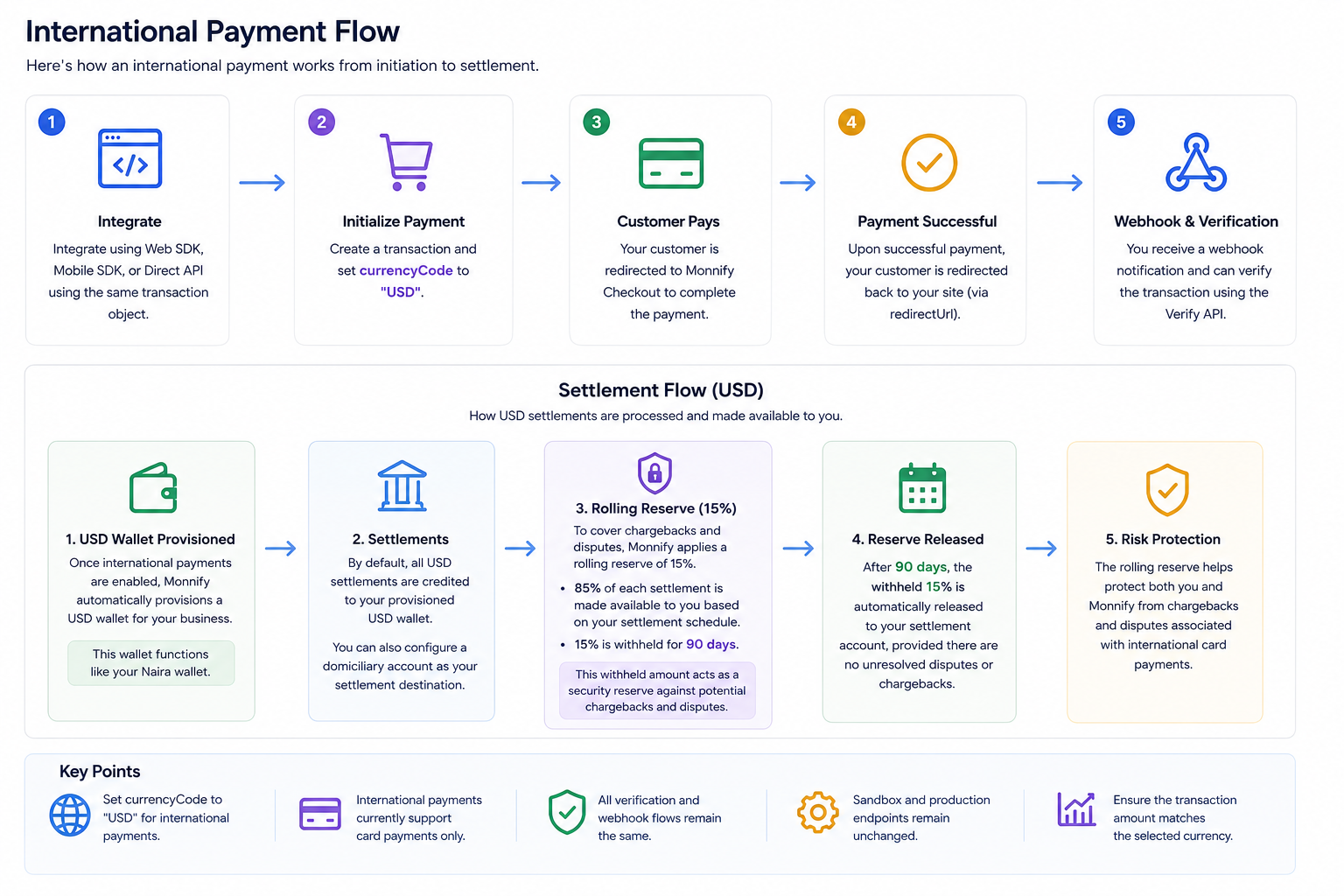
Accept international payments in USD with Monnify. Enable customers from over 150 countries to make seamless payments on your platform using our secure payment infrastructure.

Note: International USD payments currently support Mastercard only.
How it works
To collect an international payment, you need to initialize a transaction with Monnify and pass the payment details. Monnify provides two main ways to handle this:
- The Web SDK: A drop-in checkout modal that you can embed directly onto your website.
- The Direct API: A server-side integration that generates a checkout URL for you to redirect your customers to.
Supported Currencies
- Currency: USD (United States Dollar).
- Card Networks: Mastercard is the only supported card network for international payments at this time.
Initializing an International Payment
Method 1: Using the Web SDK
The Monnify Web SDK provides a secure, ready-to-use checkout interface. To initialize a USD payment, include the Monnify SDK script on your web page and pass your transaction details. Be sure to set the currency parameter to 'USD'.
Method 2: Using the Direct API
If you prefer to control the routing or are integrating from a backend server, you can call the Monnify Direct API to generate a secure checkout link. Send a POST request to the initialization endpoint with currencyCode set to 'USD' and paymentMethods set to ['CARD'].
Request Parameters
| Parameter | Type | Required | Description |
|---|---|---|---|
| amount | Number | Yes | The amount to be paid by the customer. |
| customerName | String | No | The full name of the customer. |
| customerEmail | String | Yes | The email address of the customer. |
| paymentReference | String | Yes | A unique string to identify this specific payment on your system. |
| paymentDescription | String | No | A short description of the item or service being paid for. |
| currencyCode | String | Yes | The currency code for the transaction (Must be "USD"). |
| contractCode | String | Yes | Your unique Monnify contract code. |
| redirectUrl | String | No | The URL to redirect the user to after they complete the payment. |
| paymentMethods | Array of Strings | No | Allowed payment methods. For international payments, use ["CARD"]. |
Success Response
Upon a successful API initialization, Monnify will return a checkoutUrl. You can safely redirect your customer to this URL to complete their transaction.
Settlement
Once your customer completes their transaction, the funds are processed for settlement into your accounts. When international payments are enabled on your account, Monnify automatically provisions a USD wallet for your business.
Settlement Timeline
Because international transactions strictly rely on cross-border card networks, they operate on a T+3 settlement schedule (Transaction day plus 3 business days).
- Business days exclude weekends and public holidays.
- Express Settlement Please note that Express Settlement is only supported for local payments and is not available for international transactions.
Settlement Destinations
- Default Settlement: By default, all successful international payment settlements are credited directly to your Monnify USD wallet after the T+3 period.
- Custom Settlement: If you prefer, you can configure a dedicated domiciliary bank account as your primary settlement destination. This can be managed directly from your dashboard under your Contract Settings.
Rolling Reserve Policy
To help manage the risks associated with international card networks—such as cross-border chargebacks and disputes—Monnify applies a rolling reserve of 15% strictly on USD settlements.
How the reserve works:
- 85% of each successful settlement is made available to your wallet or bank account based on the standard T+3 settlement schedule.
- The remaining 15% is temporarily withheld for a period of 90 days.
After the 90-day holding period elapses, the withheld reserve is automatically released to your standard settlement destination, provided there are no unresolved disputes or chargebacks associated with those specific transactions.

- USD settlements are processed into your provisioned USD wallet by default.
- Merchants may configure a domiciliary account as an alternative settlement destination.
- The rolling reserve applies only to international USD transactions.
- Reserved funds are automatically released after 90 days if no disputes are recorded.

Got Questions

Monnify Tutorial Videos


